



MyChart Record Sharing
What happens when you need to manage your child’s or parent’s MyChart® account or want a loved one to see your health information?
This is called proxy access. A proxy is someone you choose to view your health information in MyChart, powered by Epic. With MyChart, you can set it up in just a few steps. Here’s how to get started.
Understanding Proxy Accounts
Proxy access is the only way for one person to view another person’s health information in MyChart. Even if you have power of attorney or are a spouse, parent, guardian or legal caretaker, you’ll still need proxy access.
Setting up proxy access connects one MyChart account to another. The person you choose doesn’t need to be a Cleveland Clinic patient to view your medical records.
For legal reasons, you can set up proxy access in MyChart or request it through Health Data Services (HDS). You can also do it in person at one of our geriatrics or pediatrics offices. Staff at other appointment check-in desks don’t manage proxy access requests.
What do I need to know before I set up proxy access?
Here are a few important things to keep in mind when setting up proxy access for yourself or a child:
- Minors under the age of 18 aren’t allowed to manage their own MyChart account. You must request proxy access to the child’s account at their pediatrician’s office.
- If you’re a proxy for a child between the ages 13 and 18, you may not see all their health record information or features available for children ages 0 to 12.
- If you manage a minor child’s MyChart account, you’ll automatically lose access on their 18th birthday. If you’re a legal guardian or caregiver for a dependent adult and have a healthcare durable power of attorney, you’ll need to share proper documentation with our Health Information Management (HIM) team. You can contact HIM at 216.444.4638 for more details.
- Even if you don’t have a legal guardian, you can still grant access to a loved one, like a spouse, adult child or friend. This is called adult-to-adult access. You’ll need to sign a form to begin the process.
- More than one person can have proxy access to your MyChart account if you grant permission. This may include both parents or guardians of a minor child or multiple adult children. You’ll fill out separate forms for each proxy.
- An adult-to-adult proxy caregiver can’t make changes to your account. You’ll need to give them added permission.
Setting Up Your Adult Proxy Access Online
You can add and manage proxy access directly in MyChart using these menu options:
- Share My Record: Send an access invitation and edit proxy information
- Stop Sharing My Record: Revoke a proxy’s access
- Who’s Accessed My Record: See who accessed your record and when
How do I invite someone to access my records?
Set up proxy access through the Sharing Hub. After you log in:
- Select Family member, close friend or caretaker from choices.
- Choose Manage ongoing access to your MyChart account.
- Select Invite someone and complete the invitation.
The person you invite must open the email and click the link to accept or decline the invitation. They’ll log in to their MyChart account and enter your date of birth to verify or reject access. Once verified, they’ll be able to see your account in their MyChart.
If they enter the wrong date of birth three times, access is denied. They’ll need to contact
If your loved one isn’t a Cleveland Clinic patient, they can create a MyChart account. From the MyChart login page:
- Select Sign Up Now.
- Choose United States, then click Next.
- Choose I have none of these, then click Next.
- Select No.
- Complete Use the Please Identify Yourself form and create a MyChart username and password.
How do I access someone else’s MyChart as a proxy?
You can set up proxy access for adult patients in two ways:
- Option 1 — Invitation from the adult patient: They’ll send you an invite through the Sharing Hub in their MyChart account.
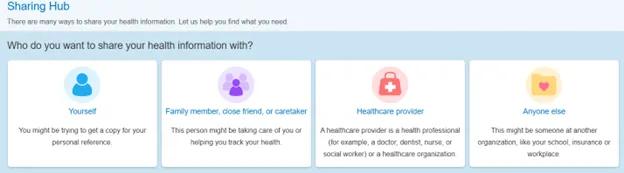
Image content: This image is available to view online.
View image online (https://assets.clevelandclinic.org/transform/c4fa8971-cfd9-461b-893b-d9e94e4dca10/MyChart-Record-Sharing-1)
- Option 2 — Court-appointed guardian or power of attorney: The process is a bit different for court-appointed guardians of adult patients. This includes being a parent of an adult child who can’t manage their medical care, or if you have power of attorney. You’ll need to send a paper caregiver form to Health Data Services. Be sure to include copies of court documents or power-of-attorney paperwork.
If you aren’t an active MyChart user, you’ll create an account. Once access is granted, you’ll receive a MyChart activation letter by email.
Setting Up Proxy Access for a Child’s Records
As a parent or legal guardian of someone under 18, you’ll need to connect their records to your MyChart account. Here’s how:
If you’re their biological or adoptive parent
Proxy access can be granted in a few ways for a biological or adopted child:
- At their pediatrician’s office
- From your MyChart account by searching for Request Access for your Child and completing the form
- By completing a paper form and sending it to Health Data Services
Once Health Data Services approves the request, Health Information Management will grant access. For faster help or questions, call HIM at 216.444.4638.
If you don’t have a MyChart account, you can set one up online or in the app.
If you’re their legal guardian or foster parent
Legal guardians and foster parents will need to use paper forms for caregivers. If you already have a Cleveland Clinic MyChart account, log in and go to the Sharing Hub. From there:
- Select Manage friend and family access.
- Click Request access to a minor’s record.
- Select Form B.
If you don’t have a Cleveland Clinic MyChart account, complete Form B and send it to Health Data Services.
Important Details About Proxy Access
Here’s what you need to know about requesting or removing proxy access for MyChart accounts:
How long does it take to process a request?
- Electronic proxy access forms usually take three business days or less to process.
- Paper caregiver forms typically take one to two weeks to process.
- Our geriatrics and pediatrics offices can set up caregiver access in person if you’re a Cleveland Clinic patient. This is the quickest choice for pediatric caregiver accounts.
To check the status of a caregiver request after submission, contact Health Information Management at 216.444.4638.
How do I revoke adult proxy access?
You can remove proxy access from your account by logging into MyChart through a web browser or the MyChart mobile app. Here’s how:
- Log in to MyChart and click Menu, then Stop Sharing My Record.
- Select the person whose access you want to remove.
- Click Revoke Access.
If you can’t do this online or through the app or get a mismatch error, contact Cleveland Clinic Health Information Management for help. They can be reached at 216.444.4638 or 800.223.2273 ext.44638. You’ll need to send your request in writing to them, along with supporting documents.
How do I revoke access to a child’s account?
To remove access to a minor’s MyChart, contact our Health Information Management team at 216.444.4638 or 800.223.2273 ext. 44638. You’ll then send your request in writing, including any supporting documents.
Once the child turns 18, your access ends automatically. They can then create their own MyChart account and invite you if desired.
What happens after I revoke access?
- Proxies can see your name on the access list for one day after access ends, but they can’t switch to your record.
- A warning displays in MyChart five days before access ends, plus one day before the proxy’s birthday.
- Proxies receive an automatic message with details about when access ends.
Understanding MyChart’s Share Everywhere Feature
Share Everywhere makes it easy to share your medical records with other healthcare providers outside Cleveland Clinic. This could be someone like your chiropractor or your child’s school nurse.
If you share your records, they can see your health summary and clinical data. They can even share notes with your Cleveland Clinic care team.
Check out these FAQs for answers to your questions and solutions to common issues:
What information can the share code recipient see?
The person you share your code with can see some of the same information you see in your MyChart account. This includes:
- Medications
- Allergies
- Health issues
- Immunizations
- Lab results
- Medical history
- Visit records
- Gaps in care
- Code status
If a part of your chart isn’t available to you in MyChart, it won’t be available through Share Everywhere, either.
What happens if the MyChart share code isn’t working on Share Everywhere.com?
Contact Epic at 608.271.9000 for help.
Can I use Share Everywhere to share a family member’s information?
Yes, if the healthcare organization allows it and you have access to the family member’s MyChart account. For example, if you have access to your child’s chart, you can generate a share code from the child’s record for a provider just like you would from their own account. The provider will see the same information for your child that you can see.
How long can the share code recipient view my record?
The person you share your code with can view your health information only until they log out of Share Everywhere. They won’t be able to log in later and see it again unless you provide a new share code.
Is Share Everywhere secure?
Share Everywhere is designed to keep your information private. You must be logged in to MyChart on a web browser or mobile app to generate a share code. Each code works only once and expires after five minutes.
The person you share it with also needs your date of birth to view your information. If they enter it incorrectly three times, the code stops working. Plus, the page where the recipient enters the code is protected by reCAPTCHA for an extra layer of protection.
Does Share Everywhere work on all devices?
You can generate share codes from any computer or device that can access the MyChart website, or from the MyChart mobile app on Android or iOS. Make sure your app is updated to version 5.4 or higher so you can use Share Everywhere.
Where do notes that providers write on the Share Everywhere website go?
When you share your MyChart record with providers using Share Everywhere, they can input notes about your care. These notes are filed in your Cleveland Clinic MyChart.
Can someone from your health system respond to the person who sent the note through Share Everywhere?
There’s no way to respond directly through Share Everywhere, but providers are prompted to include their contact information in the notes they send so they can be reached if needed.
Sharing Your Record With Another Hospital System
You can link your Cleveland Clinic MyChart account with other hospital systems you’ve visited. This lets you see health information from those organizations in the same MyChart account.
To share your medical record with another hospital system — like University Hospitals of Cleveland, Summa Health or MetroHealth — follow these steps:
- Click on Menu, then Link My Accounts.
- Use the search bar under Discover Accounts to find the hospital system.
- Select the organization, then click the orange Link Account button.
If the hospital system doesn’t appear in your search results, it may not use the Epic platform or may not take part in records sharing.
To see which accounts are already linked, go to the Linked Accounts section near the top of the page. For more information about sharing records with other organizations, visit: