




MyPractice is an integrated electronic medical record system designed specifically to meet the needs of busy private practice physicians.
MyPractice Community allows private practice physicians access to their entire practice, anytime, from anywhere there is an Internet connection. All your patient information, test results, orders, progress notes, medications and treatment plans are available in your office, in the hospital, from your home or when you are on the road.
With just a login name and password you can take your practice with you, anywhere you go. Best of all, because MyPractice Community is an integrated electronic medical record system, it can connect all the members of your care team in a single, efficient environment.
The MyPractice Community electronic health record system is the same system used in all Cleveland Clinic facilities. It is composed of an integrated suite of software modules created by Epic® Systems, a recognized leader in healthcare information technology.
Epic is certified by the Certification Commission for Healthcare Information Technology (CCHIC) and in 2022, was ranked as the top overall software suite for the 12th year in a row by KLAS Research.
If you are a private practice physician seeking a reliable, affordable electronic health record system to integrate into your medical practice, please consider MyPractice Community. To learn more about getting started, please call 216.442.0440.
The MyPractice system (Epic) will be unavailable during the following dates and times:
Saturday, September 12, 2026, from 1:00 a.m. until approximately 3:30 a.m. ET.
Reason: Epic upgrade. The read-only system will be available.
Please note: timing may be adjusted for these downtimes over the coming weeks. Consult this page for the most up to date information.
When a scheduled Epic downtime begins, you will no longer be “kicked out” of Epic. You should save your work and log out prior to the downtime. The new red Epic button on the computer taskbar will not launch Epic ‘Read Only’ during a downtime.
You must follow these steps to log into Read Only:
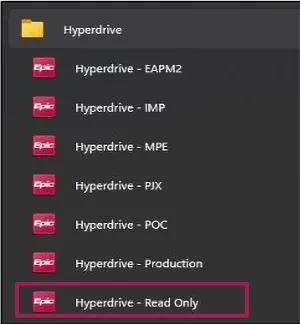
Image content: This image is available to view online.
View image online (https://assets.clevelandclinic.org/transform/7f472ad2-a0a4-4c80-979c-4d2844ae4250/epic-downtime)
Standard Epic tools enhance clinical workflows and communication:
The following third-party vendors enable data sharing and integration:
MyPractice Community comes pre-populated with patient data. If your patient has ever been treated anywhere within Cleveland Clinic, the information is already available. The system keeps your patients' records current and transmits prescription and laboratory orders electronically. You can add information to a patient's file or share the information contained with other physicians and care team members.
Outside paper results, referral letters and progress notes may be scanned into the MyPractice Community system and displayed as an image for future reference. The system features automated, real-time physician decision support tools to minimize medical errors, encourage formulary compliance and ensure that patients receive recommended health-maintenance and disease-management services.
Key features include:
MyPractice Community is an "interoperable" electronic health record system, building upon the connectivity of a private physician practice by securely interfacing with the electronic systems used by other medical service providers.
As a secure, HIPAA-compliant system, access is limited to medical professionals actively participating in a patient's care.
Private physician practices can use MyPractice Community to significantly streamline daily workflow.
Physicians receive, in real time, the following patient information related to the specialty care a patient receives within a Cleveland Clinic hospital:
MyPractice Community is pre-loaded with 100+ million data elements related to approximately five million patients.
MyPractice Community is connected to Cleveland Clinic laboratories and laboratory services and most major pharmacy outlets.
Legally, a patient is the owner of any personal health-related information documented by healthcare professionals during the course of treatment.
Data captured during the course of patient encounters is associated with the physician and practice providing a patient's treatment and is accessible only to those involved in a patient's care.
The data contained in the secure MyPractice Community master patient database is stored at the Cleveland Clinic Data Center. All data is backed-up nightly to two off-site storage systems that provide additional security and complete system redundancy.
MyPractice Community software upgrades—which automatically occur as vendor system upgrades become available—occur during weekend, non-business hours.
All software upgrades are pre-tested by the MyPractice Community team prior to integration, and all new functional additions to the system are communicated to practice personnel prior to the launch.
Following the termination of your MyPractice Community service, you will receive a CCD document of your practice's data.
The data you entered while using the MyPractice Community service does remain in the MyPractice electronic medical record database and will be accessible to you or your patient's care team if, in the future, you require specialty medical services from Cleveland Clinic.
Access to your schedule and other operational information is limited to those individuals who are involved in accomplishing your practice's daily workflow tasks.
Because MyPractice Community is a flexible system that may be customized to meet the needs of your practice, it is important to identify a member of your staff who will assist the MyPractice Community implementation team with your system's initial workflow design, build and development.
Standard interfaces include:
Other interfaces will be considered, though possibly at an additional cost.
Workstation includes:
Software includes:
Printing includes:
Scanning includes:
Network includes:
Supplied by MyPractice Community:
Yes. MyPractice Community offers ongoing system training, telephone support and a dedicated practice liaison who will help your team successfully utilize the features and functions that will positively impact your practice's efficiency and effectiveness.
MyPractice Community has the following dedicated support personnel:
The MyPractice Community support desk is available Monday - Friday, 8 a.m. - 5 p.m. Dedicated support outside of normal business hours is also available for a fee.
A team member will respond, prioritize and attempt to resolve all issues or questions consistent with the severity of the issue. Issues reported outside of business hours are addressed the next business day.
Make sure you do not have your Caps Lock on (No capital letters). Remember that your user ID never changes. Only the password will change. Make sure you are not typing in your user ID twice.
If you change your portal page ID (private clients), this will also change your Epic password. They are synchronized to change at the same time.
Make sure you are logged into the correct department. You may still be logged into the hospital or another department. Epic remembers the last department you were logged into.
Check your login department by looking in the blue banner at the very top of your computer screen.
If you unsure under which category you should scan your document, please click visit the Forms tab and refer to scanning documents located on that page.
If you are still unsure, feel free to call our Help Desk at 216.442.0440.
Fill out a Duplicate Request form provided to your practice and fax it to 216.448.5112.
If either the patient's Date of Birth or Social Security number are incorrect in one of the records, please verify the correct numbers with the patient (also please indicate that it was verified with the patient).
Our MyPractice Community team will review the pricing structure of the service during your scheduled, in-office system demonstration, or you may call 216.442.0440 to speak with a representative.
The MyPractice Community team can answer questions or concerns by phone or email, Monday - Friday, 8 a.m. - 5 p.m.
For evening and weekend support, please leave a message including the following:
A MyPractice community analyst will return your call promptly in order to assist.
Fax Number
Quality & Client Development Manager
Reporting Requests
Private practices that have adopted the MyPractice Community application and completed their go-live period can provide trainer-initiated feedback by completing one of the following surveys: