



MyChart Bedside Support
It’s hard to know what’s going on when you’re in the hospital. MyChart Bedside helps by giving you the information you need during your stay.
What Is MyChart Bedside?
MyChart Bedside builds on your regular MyChart account. It’s only available when you’re staying in the hospital for treatment or observation, or when you’re receiving care in the emergency department (ED).
How Do I Get Started?
If you already use MyChart, you’ll get a text inviting you to view your hospital stay when you arrive at the ED or are admitted to the hospital. If you don’t have MyChart, you’ll get a text or email explaining how to sign up. Once you do, you can access your hospital stay details.
There’s nothing extra to download. If you’re already using MyChart, the app recognizes when you’ve been admitted. It switches to the MyChart Bedside view automatically — so you can focus on your care.
What Features Does MyChart Bedside Offer?
To use MyChart Bedside, you’ll need a mobile device with the MyChart app. You can only view My Hospital Stay in the app while you’re in the emergency department or in the hospital. This information isn’t available through a web browser like Chrome or Edge.
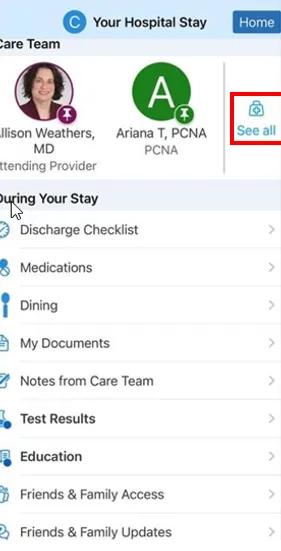
Image content: This image is available to view online.
View image online (https://assets.clevelandclinic.org/transform/8829a06e-d31e-4329-a0d1-dfb1e9c751b3/MyChart-Bedside-1)
Medication, test results and consent
During your stay, you can view medications and test results related to your visit. These options appear at the top of your screen when selected.
The app also lets you view and sign consent forms under the My Documents feature.
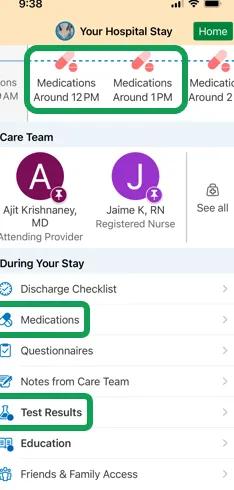
Image content: This image is available to view online.
View image online (https://assets.clevelandclinic.org/transform/b241f8ad-7e9d-40c8-a911-77f3ba101477/MyChart-Bedside-2)
Tracking your progress
The Discharge Checklist option highlights milestones related to your stay. It also helps you see what still needs to happen before you leave the hospital. Unlike other features in MyChart Bedside, it won’t appear right away. It only becomes visible once your care team begins adding milestones.
It’s important to understand that provider notes and test results follow a standard release schedule. So, it may take time to see some information.
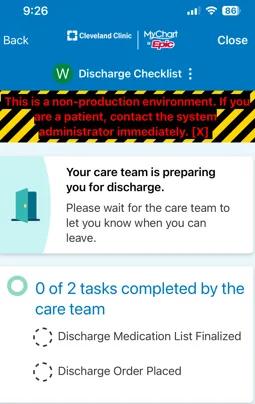
Image content: This image is available to view online.
View image online (https://assets.clevelandclinic.org/transform/57f19a31-b083-40c2-af86-7cee3ed226d0/MyChart-Bedside-3)
Ordering food with MyChart Bedside
The Dining Menu feature connects you to the CBORD food service app, where you can order and customize your meals during your stay.
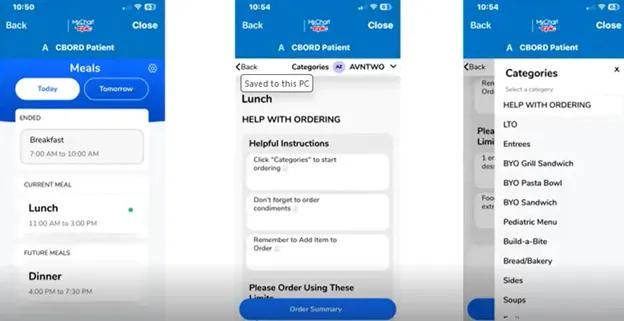
Image content: This image is available to view online.
View image online (https://assets.clevelandclinic.org/transform/6cc56ef1-ce3a-4fe2-a892-6147db5d8b68/MyChart-Bedside-4)
Learning about your care
The Education feature allows you to view videos and other information important to your stay with us.
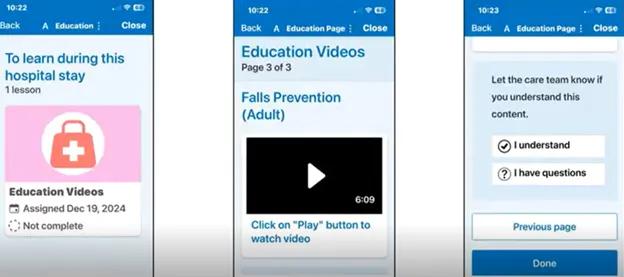
Image content: This image is available to view online.
View image online (https://assets.clevelandclinic.org/transform/18048e6a-3478-43f8-af62-d4431192c7a5/MyChart-Bedside-5)
Self-Service Support
Having problems with MyChart Bedside? Following some of these steps may help you resolve your issue:
Can’t log in to the app
You can try to recover your username or reset your password by clicking on Forgot login information? on the MyChart website or mobile app login page.
If you still have login problems, please contact MyChart Support at 866.915.3383 for help.
Assigned care team members aren’t showing up in app
Contact MyChart Support at 866.915.3383 for troubleshooting.
Wrong diagnosis in Reason for Stay
You’ll need to talk with your provider about this so we can update your health record.
Can’t return to my regular MyChart page
In the right upper corner, click Home.
Allowing loved ones to access MyChart Bedside
- Adult patients: Use the Friends and Family Access feature to share your hospital stay information. Your loved ones will receive an invitation email, and if they have a MyChart account, they can view your status. Sharing is optional, so you stay in control of who sees your information.
- Patients under the age of 18: If your child is in the ED or staying in the hospital, you can add them to your personal MyChart account by selecting Request Family Access in the Messaging menu.
Can’t access Patient Education features
If you have problems connecting to Patient Education videos, check whether you’re using the latest version of the MyChart app. If this does not solve the issue, contact MyChart Support at 866.915.3383.
Can’t order meals
If you run into problems when ordering meals using the Dining feature, contact MyChart Support at 866.915.3383.